Onboarding Guides
All

Borderless

A step-by-step guide on how to join a collective and participate in a deal on Borderless.
Step 1: Log In or Create an Account on Borderless
Once you click a collective's unique link, you'll be directed to the collective page. Click the "Join or Log In" button. If you already have an account on Borderless, log in and you'll be directed to your collective's dashboard. You can skip to Step 3 of this guide to continue. If you don't have an account, you'll need to create one. It takes less than 3 minutes to complete.
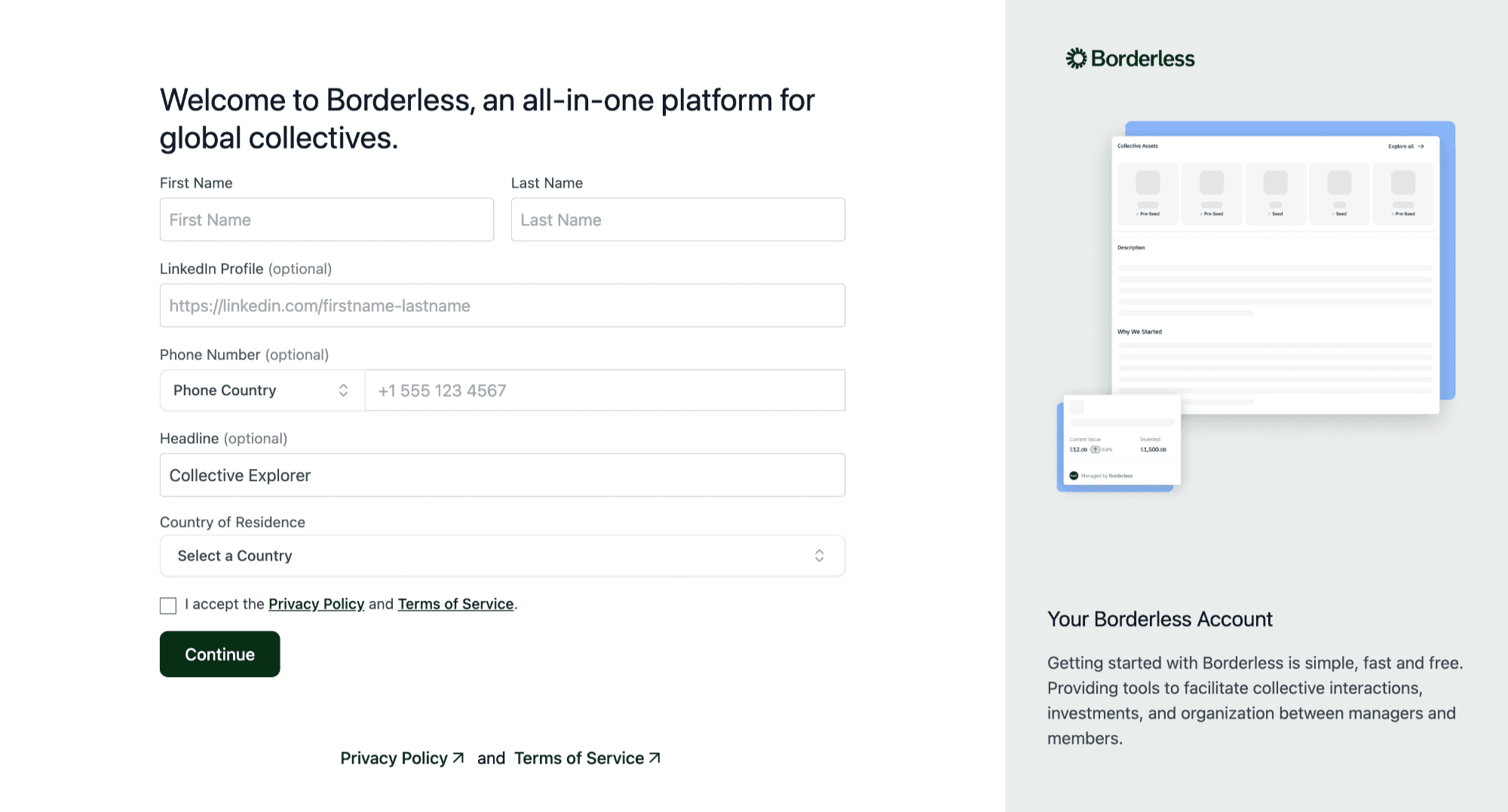
Step 2: Create an Account on Borderless
If you don't already have an account on Borderless, you'll be directed to the sign-up page. Fill in your details accurately. For the "headline" field, you can type "Collective Member" or "Collective Explorer". Click "Continue" after you have filled in all the fields and you'll be directed to the second page.
Next, you'll be asked to complete a Self-Certified Sophisticated Investor Statement. Read through the options carefully and select the one that best applies to you. This will take you to the next step of your account setup. This will take you to the next step of your account setup.
This confirms you're eligible to make this kind of commitment, which is why it's required before you can view deal details.
Step 3: Apply to Join the Collective
Once your account is set up, you'll have access to your collective's dashboard on Borderless. You can click the "Description" tab to read about the collective and the "Collective Resources" tab to review resources shared by the collective managers.
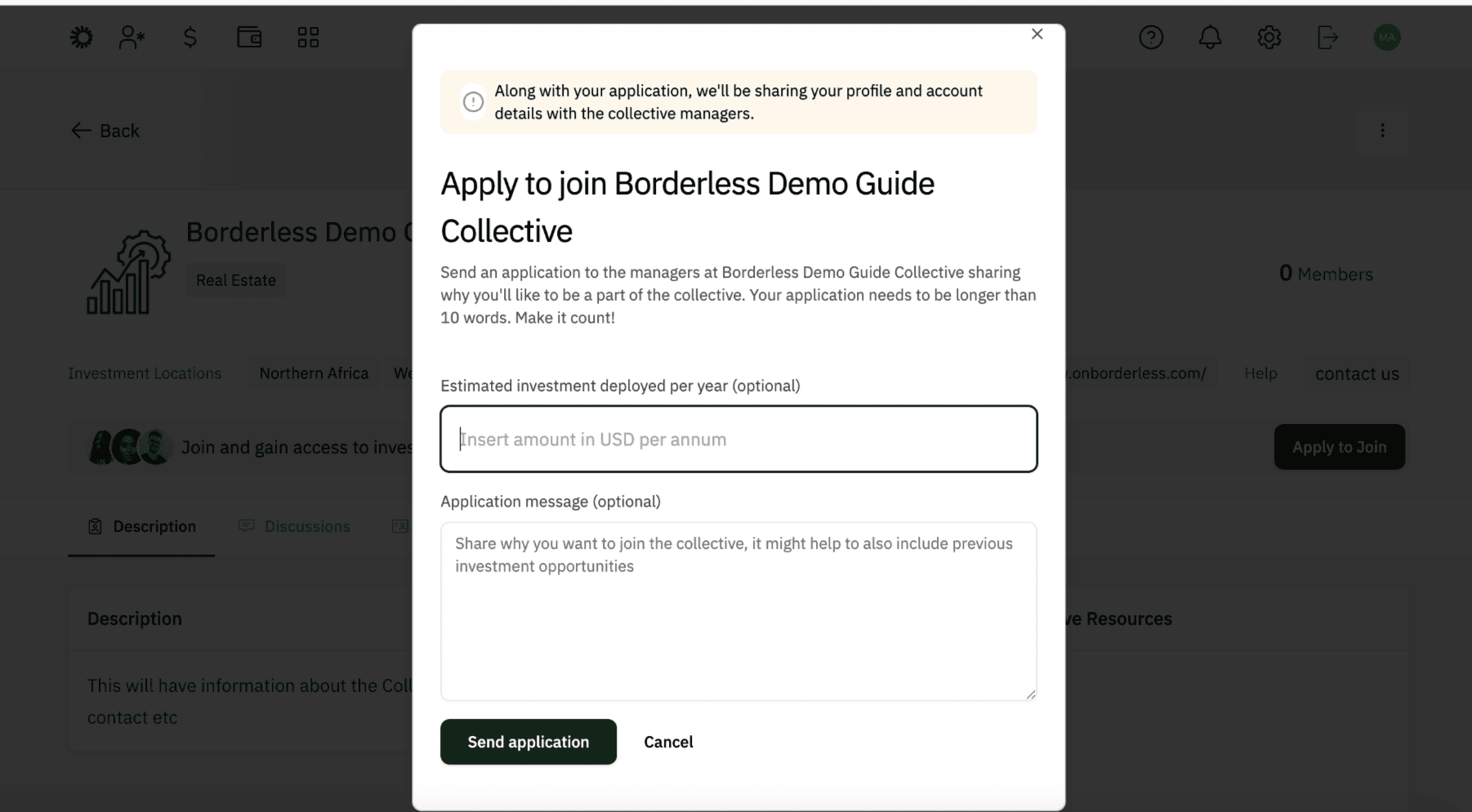
Once you're ready, click "Apply to Join" at the top right corner of the collective page. You'll get a prompt to fill a form with fields on the estimated amount you intend to deploy through the collective per year and an application message stating why you'd like to join. Both fields are optional, but we recommend filling them in as doing so may help the collective manager(s) make a decision when reviewing your application.
If you choose to fill in the estimated amount, use this format e.g. 100,000
Please note that this amount is in USD and the money will NOT be withdrawn from your account.
Once you submit your application, you'll receive an email confirming it has been sent to the collective manager(s) for review. It typically takes 2 to 3 business days to receive a response. If you haven't heard back after 2 to 3 business days, reach out to us at hello@onborderless.com
Step 4: Access Your Collective Dashboard
Once your application is approved, you'll receive a welcome email. Open it and click the "Log in to Borderless" button. You'll be redirected to your dashboard on the platform.
On your dashboard, click the "Joined" tab under "Collectives" to see all the collectives you're a part of. Click on your collective and you'll now have full member access.
Now that you have full member access, you can access the Discussions, Opportunities, Members, Events and Members Area tabs. Click the "Opportunities" tab to see what's currently available in your collective. Click on any opportunity to read through the documents and details shared by the collective manager.
Step 5: Complete KYC Accreditation
Before you can commit funds to an opportunity, you'll need to complete KYC accreditation. This is a standard verification process. Click the "Invest" button at the top right corner of the opportunity page to begin.
Make sure you have your valid ID ready to scan and you’re in a well lit environment to take the photos required. Follow the prompts to complete your verification. This should only take a few minutes.
If you run into any issues during KYC, send an email to hello@onborderless.com with the subject line "KYC Support Request" and we'll help you resolve it.
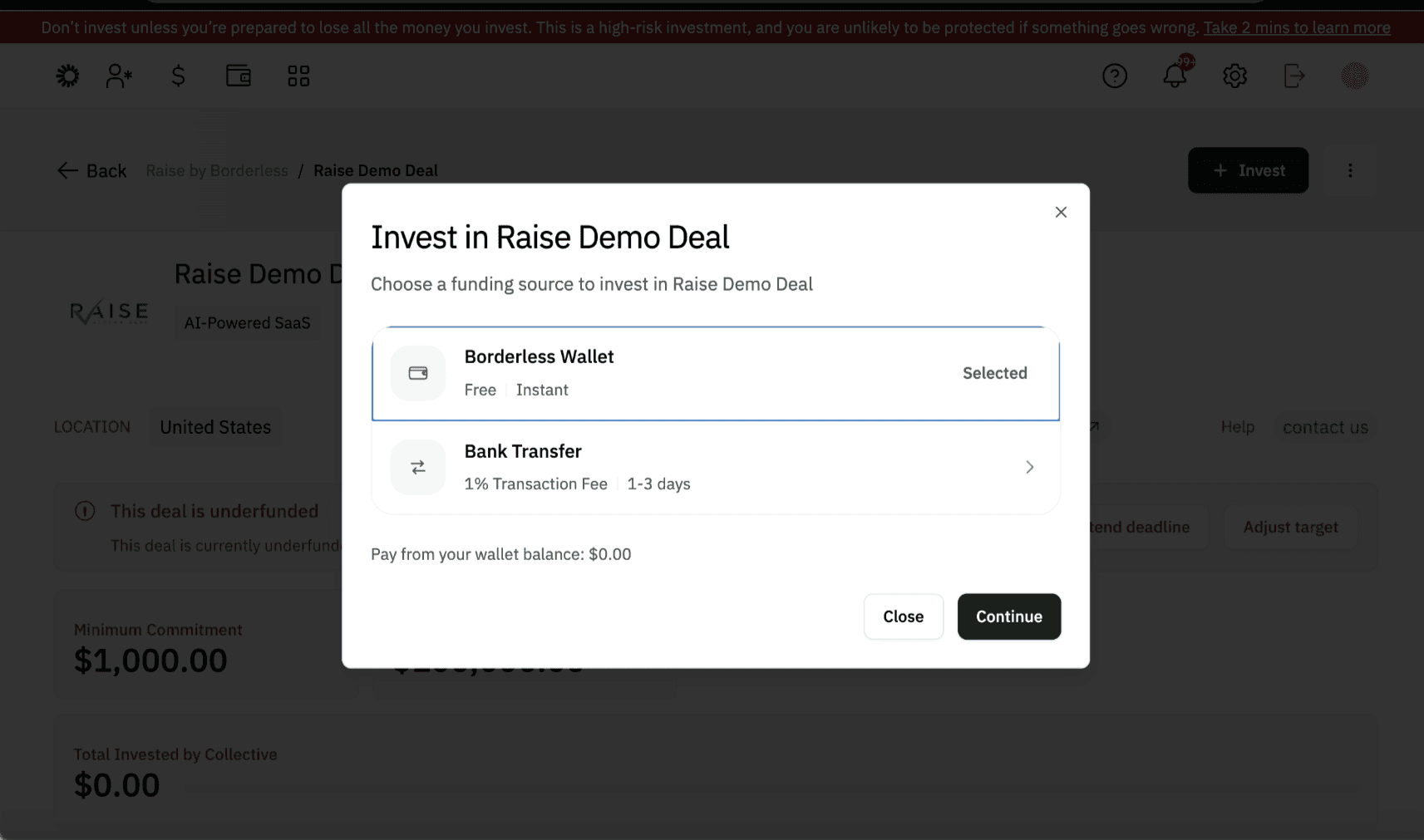
Step 6: Choose How to Pay
Once KYC is complete, you can commit funds in one of two ways: through your Borderless wallet or by direct bank transfer.
Using your wallet:
You can only fund your wallet in USD. As the wallet is currently USD-denominated, sending funds in EUR or GBP will automatically convert to USD, and you will see the conversion rate at the bottom of the page.
Please note that funding your wallet should be done from an account in your name as the name should match the name used for the Bridge KYC and for your wallet.
EUR and USD wallets are the direct choices available in the wallet tab. For GBP, you can request a GBP wallet through “FASTER GBP PAYMENTS” under “Wallet features” in the settings tab (the gear icon at the top right of your screen).
Please note that the rates you see at the time of sending may not be the same when funds are received so adding a little buffer could be helpful in ensuring your wallet is funded with adequate amounts.
Once your wallet is funded, it's faster and reconciles automatically within the platform. You'll be prompted to enter the amount you want to commit.
If your wallet balance doesn't cover the minimum amount, you can top up directly. Read this guide on how to set up and fund your wallet if you haven’t.
If your wallet already has sufficient funds, continue straight to payment.
Using bank transfer (recommended for EUR and GBP):
Direct Bank transfer also works across USD, EUR and GBP, if you do not have a wallet balance. Note that the bank accounts details for these are periodically updated or changed on the platform and you should only use account details that are live on the platform at the time of you making a transfer. Enter the amount you want to commit. Select the currency you prefer and make your payment. Once you've sent the funds, click "I have sent the money" at the bottom right of the page. Please add the reference at the top of the page in the transfer as this helps us reconcile easily.
Please note that for EUR and GBP, our Banking provider “Bridge” uses “Banking circle S.A”.
Funding in NGN, GHS, KES, XOF or ZAR
To send investments in these African currencies, enter the amount you want to commit. Select the currency you prefer and make your payment. Once you've sent the funds, click "I have sent the money" at the bottom right of the page. Send your proof of payment to hello@onborderless.com with the subject line "Local Currency Payment Made”.
A platform fee applies to every deal and will be displayed on screen before you confirm payment, regardless of the payment method you use. This fee covers the usage of the Borderless platform to make and manage your investments. There is also a fee applicable on payouts.
Step 7: Confirmation
Once your payment is sent, here's what happens next depending on your payment method:
If you paid via wallet: Your payment is automatically reconciled and you'll receive a notification confirming your commitment, along with the necessary documentation. No further action is needed.
If you paid via bank transfer: You'll need to send proof of payment (PoP) to hello@onborderless.com with the subject line "Proof of Payment" so your payment can be reconciled. Please make sure to include your Payment Reference in your transfer; this is the unique reference code provided to you during the payment process. It's how we match your payment to your account, so it's important not to skip this step.
Once reconciliation is complete, you'll receive a notification confirming your commitment along with the necessary documentation.
Need Help?
If you run into issues at any point in this process or while using the platform, reach out to the Borderless team at hello@onborderless.com with the subject line "Support Request" and we'll get back to you as soon as possible.
Not on Borderless yet? It takes 2 minutes to fill out this form here, and we'll send you everything you need to get started.
SHARE THIS ARTICLE
Latest Articles

Article
Why Diaspora Angel Investors Hesitate to Back African Startups And How Collective Investing Can Build the Trust That’s Missing

Article
How to Source Good Deals for Your Collective

Article
VCs vs Angel Investors: How to Tailor Your Fundraising Pitch

Article
Why Informal Early Funding Could Kill Your Series A Round
Who are our target audience?

How much does Borderless cost?
Can I join multiple communites?
What type of collective can I create on Borderless?
How can I engage my collective members?
Can I use Borderless for collective investments?
What security measures does Borderless have in place?arget audience?
Does Borderless provide customer support?


Privacy Policy
Terms of Service
© Borderless 2025



hello@onborderless.com